
Fencing quote software for UK contractors
Fencing quote software for UK contractors.
Quote fence repairs, replacements, gates, posts, gravel boards, waste removal, and labour, then track every open quote until the customer says yes or no.
Soleify helps UK fencing contractors send professional fencing quotes faster, keep measurements and site notes tied to the job, follow up before replacement work goes cold, and invoice from the accepted scope.
It is intentionally lighter than full job-management software. The focus is quoting, follow-up, and quote-to-invoice for sole traders and small teams.
Fencing quotes get messy fast.
Fence replacement quotes get messy when measurements, materials, labour, waste removal, and customer approval all live in different messages.
- Measurements and material choices get lost after the site visit.
- Repairs and full replacements need different quote structures.
- Customers compare quotes and go quiet.
- Materials should not be ordered until the scope is approved.
- Follow-ups are easy to forget when several jobs are open.
A fence replacement quote is rarely just one number. You may need panels, posts, gravel boards, gates, labour, disposal, access notes, and upgrade options all shown clearly enough for the customer to approve the right scope.
Soleify keeps the quote, customer, site notes, and follow-up in one simple workflow so open fencing work does not disappear into WhatsApp, email, or memory.
Built for the fencing jobs you quote every week.
Storm-damage repair
Side gate installation
Closeboard fencing
Featheredge fencing
Concrete posts and gravel boards
Old fence removal
Fence repair vs full replacement
Optional upgrades
Product proof
See the product behind the quote.
See how Soleify keeps fencing quotes clear on measurements, materials, and open work that still needs a decision.
Screenshots show real parts of Soleify. Example names and job details are illustrative only.
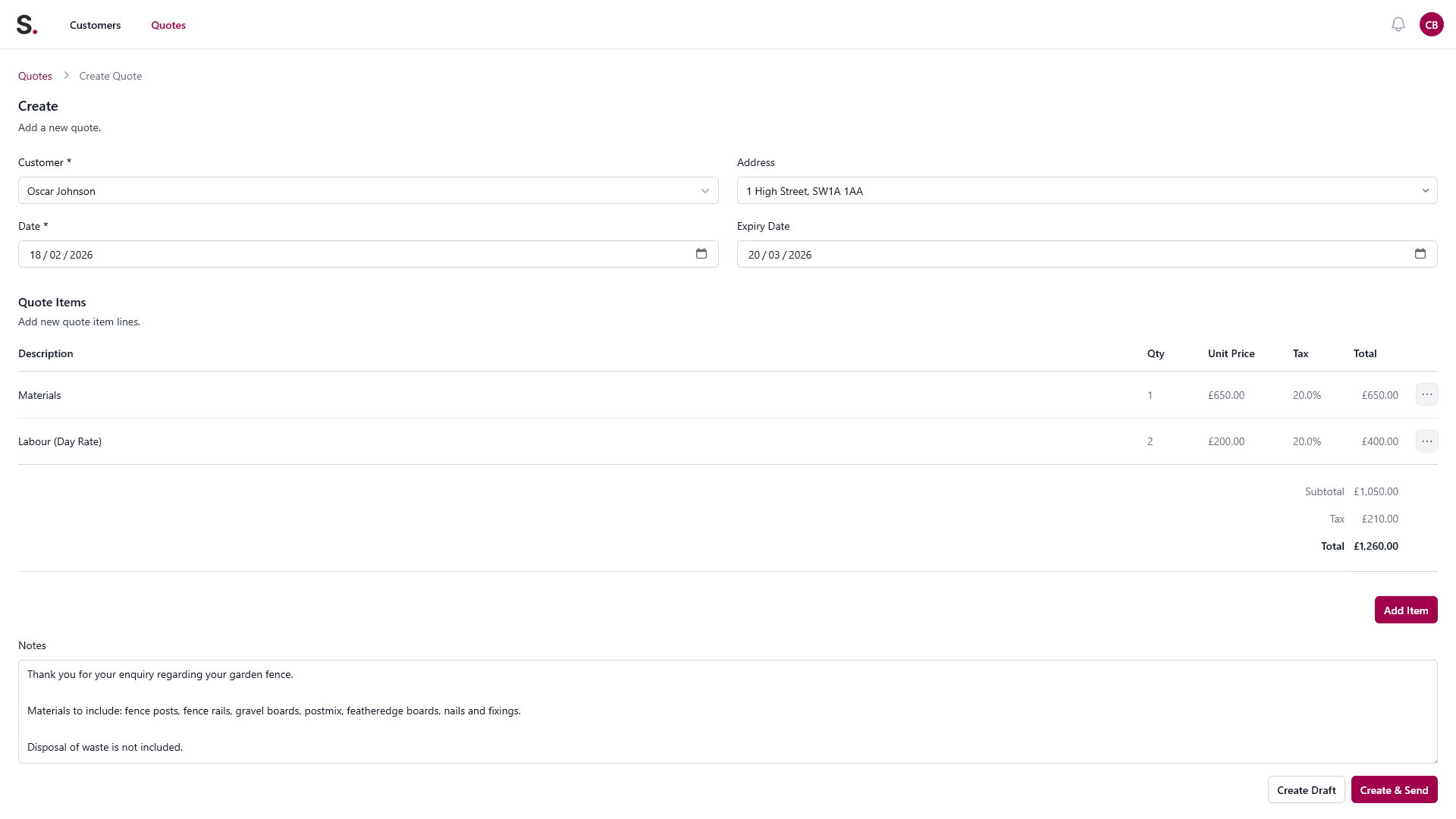
Quote builder view
Build a clear landscaping quote while the visit is still fresh
Add the customer, itemise the work, and keep the measurements, materials, and job details together instead of rebuilding them from texts later.
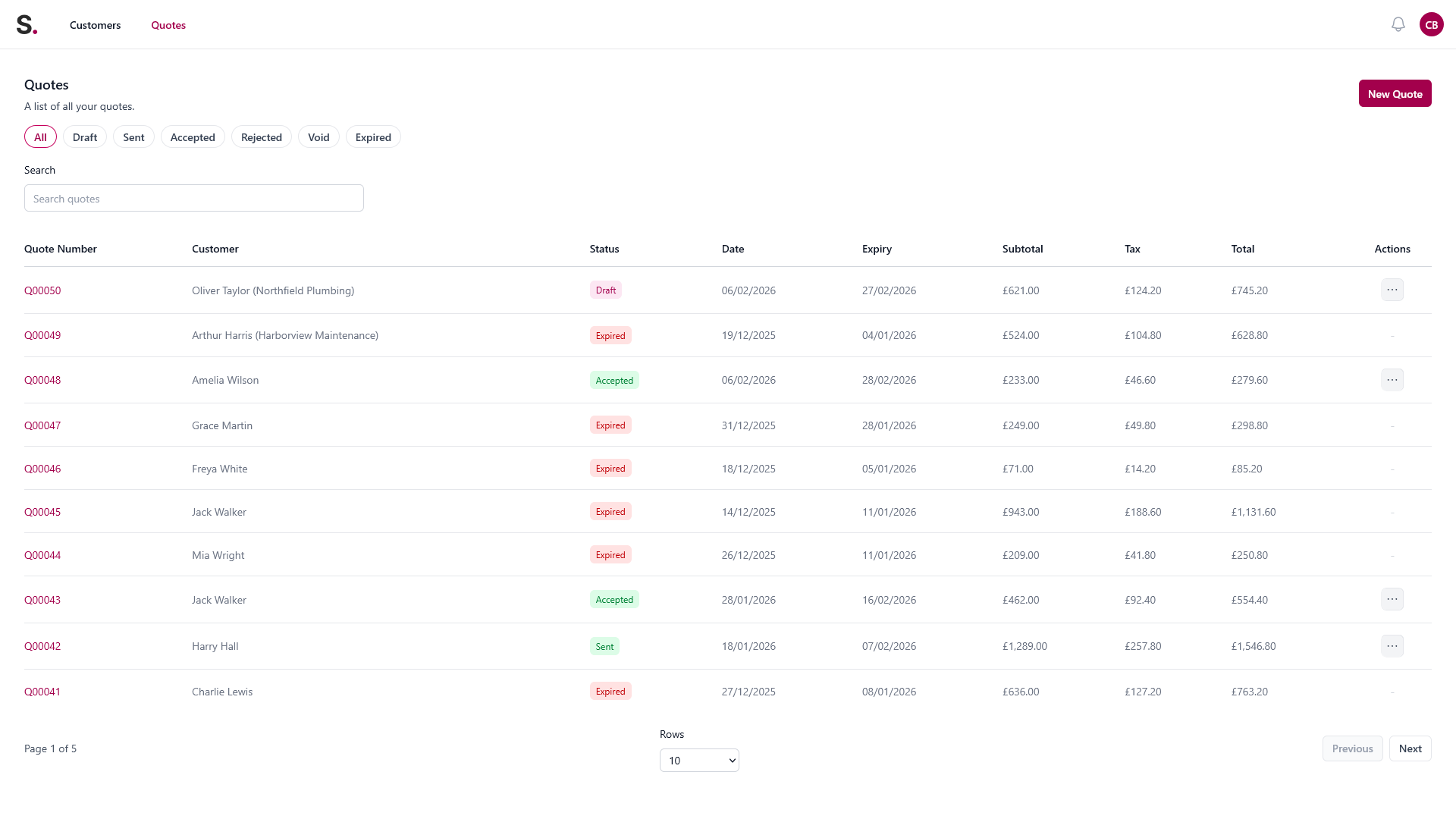
Open quote tracking
Know which quotes are still open
See quote status in one place so follow-ups do not depend on memory, scraps of paper, or scrolling back through WhatsApp.
From site visit to accepted fencing job.
1. Capture the job
Customer details, site notes, measurements, access, old fence removal, and material assumptions.
2. Build the quote
Add panels, posts, gravel boards, gates, labour, waste disposal, and optional extras.
3. Send it professionally
Give the customer a clear quote instead of a rough total in a message.
4. Track the open quote
See what is still waiting for a yes or no.
5. Follow up
Chase politely before the job goes cold.
6. Invoice from the accepted quote
Avoid retyping the same job details.
See how a fencing quote could look in Soleify.
Sample job: Replace rear garden fence - 9 bays.
Line items
- Remove existing damaged fence and posts.
- Supply and install 9 closeboard panels.
- Supply and install concrete posts.
- Supply and install concrete gravel boards.
- Fit side gate.
- Waste removal and disposal.
- Labour.
- Optional: upgrade to featheredge fencing.
- Optional: add second gate.
Quote notes
- Quote assumes clear access through side gate.
- Price valid for 14 days.
- Materials ordered after quote approval.
- Start date subject to material availability and weather.
- Waste removal included only where listed.
Before Soleify vs with Soleify.
| Before Soleify | With Soleify |
|---|---|
| Measurements in notes or WhatsApp | Measurements stored with the quote |
| Rough total sent by message | Professional itemised quote |
| No clear yes/no status | Open, accepted, declined, or follow-up due |
| Customer goes quiet | Follow-up reminder keeps it visible |
| Rewriting job details for invoice | Invoice from accepted quote |
Good fit.
- You quote repair and replacement fencing work regularly.
- You want measurements, materials, and labour kept clearer.
- You want open-quote visibility before ordering materials.
- You want a simpler route from accepted quote to invoice.
Not a full job-management system.
- You need staff scheduling, resource planning, or dispatch.
- You need wider operational workflow in one platform.
- You run a larger business with complex office-led processes.
Helpful next pages.
- Quote follow-up tracking if you need to keep replacement quotes visible.
- Quote-to-invoice if accepted fence jobs still create repeat admin.
- Free fencing quote template if you want a starting structure.
- Landscaping quoting software if your work also includes decking, patios, or garden projects.
Fencing FAQs.
Can I quote repairs and full replacements separately?
Yes. That is often the clearest way to help the customer compare a repair against a full replacement scope.
Can I show panels, posts, gravel boards, gates, labour, and disposal separately?
Yes. Soleify is useful when material and labour lines need to be visible rather than collapsed into one rough total.
Can I keep measurements and site notes with the quote?
Yes. The goal is to keep the customer, quote detail, and visit context together so follow-up is easier.
Can I follow up before ordering materials?
Yes. Open quote visibility helps you confirm approval before you commit to materials.
Can I invoice from the accepted quote?
Yes. Soleify is designed to make the handover from accepted quote to invoice simpler.
Is Soleify a full fencing job-management system?
No. It focuses on quoting, open quote tracking, follow-up, and invoicing for smaller contractors.
Is it suitable for sole traders?
Yes. Soleify is aimed at sole traders and small teams that want a lighter admin workflow.
Can I use it for landscaping jobs too?
Yes, especially if your landscaping work is still quote-led and includes fencing, decking, patios, or garden project quotes.
Try Soleify on your next fencing quote.
Create the quote, keep it visible, follow up, and invoice from the accepted scope.